









 Стоит задача получить балансировщик сетевой нагрузки для WEB серверов с поддержкой SSL и в тоже время поддержкой Сookie (SSL Network Load Balancer). Причем сервера (два или больше) стоящие за NLB слушаю только 443 порт. Все реализованно на Linux машине и opensours продуктах Pound и HAProxy. Такой бесплатный NLB сравним с знаменитым балансеровщиком F5 или Amazon NLB.
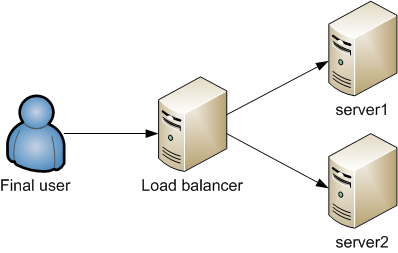
Конфигурация применима как к виртуальным машинам так и к физически хостам. Linux хост может иметь один или два физических интерфейса. В зависимости от этого будет отличаться конфигурация Pound. Мои примеры сделаны для Linux хоста с одним физическим интерфейсом 10.0.0.3:443. Pound будет отвечать за де-крипшин входящего трафика и проксирования трафика к HAProxy. HAProxy работает на 127.0.0.1:8083. HAProxy примет решение на какой сервер передать трафик в зависимости от Сookie или рендомнно, в зависимости от настроек и передаст трафик на конкретный порт для Pound 127.0.0.1:8081/8082. Pound снова криптует пакеты от HAProxy и отправляет их на указаный сервер за NLB 10.0.0.1 или 10.0.0.2.
Обратный трафик в обратном порядке. В тестовой лаборатории собиралась инфраструктура с тремя выделленными серверами Pound - HAProxy - Pound - все прекрасно работало. Принято решение объеденить все на одном сервере, так как сетевая нагрузка на NLB большая не предполагалась, а важное значение имело отказоустойчивость и доступность сервисов за NLB.
Я опускаю установку Linux хоста, Pound и HAProxy. Просто ставьте последние версии, правьте конфиги под свою IP адресацию и SSL сертификаты и рестартуйте Pound и HAProxy.
Так же хорошо натроить таймауты под свои локальные серьвера, в зависимости от таймаутов их кешей.
Конфигурация Pound.
## Minimal sample pound.cfg
##
## see pound(8) for details
######################################################################
## global options:
User "www-data"
Group "www-data"
#RootJail "/chroot/pound"
## Logging: (goes to syslog by default)
## 0 no logging
## 1 normal
## 2 extended
## 3 Apache-style (common log format)
LogLevel 0
## check backend every X secs:
Alive 60
TimeOut 60
## use hardware-accelleration card supported by openssl(1):
#SSLEngine ""
# poundctl control socket
Control "/var/run/pound/poundctl.socket"
######################################################################
## https to http, redirect all requests on port 8083 ("ListenHTTP") to HAProxy
############################# WEB ####################################
ListenHTTPS
Address 10.0.0.3
Port 443
## Certificate
Cert "/etc/ssl/mycerts/myserver.pem"
## allow PUT and DELETE also (by default only GET, POST and HEAD if 1 or 2)
## super important !!!
xHTTP 3
Service
BackEnd
Address 127.0.0.1
Port 8083
End
End
End
######################################################################
## http to https, redirect all requests from 127.0.0.1 to local webservers
############################# WEB ####################################
ListenHTTP
Address 127.0.0.1
Port 8081
## allow PUT and DELETE also (by default only GET, POST and HEAD)?:
xHTTP 3
Service
BackEnd
Address 10.0.0.1
Port 443
Https "/etc/ssl/mycerts/myserver.pem"
End
End
End
ListenHTTP
Address 127.0.0.1
Port 8082
## allow PUT and DELETE also (by default only GET, POST and HEAD)?:
xHTTP 3
Service
BackEnd
Address 10.0.0.2
Port 443
Https "/etc/ssl/mycerts/myserver.pem"
End
End
End
Конфигурация HAProxy.
global
log 127.0.0.1 local1 notice
maxconn 4096
user haproxy
group haproxy
daemon
defaults
log global
maxconn 4096
mode http
timeout connect 60s
timeout client 30m
timeout server 30m
timeout tunnel 60m
# WEB
frontend http_frontend
bind 127.0.0.1:8083
mode http
default_backend web_https
#!!!!!!!!!! WEB loadbalancer !!!!!!!!!!!!!!!!!!!!!!!!!
backend web_https
mode http
stats enable
balance roundrobin
# balance leastconn
# balance source
# balance rdp-cookie
# cookie [ rewrite | insert | prefix ] [ indirect ] [ nocache ] [ postonly ]
# [ preserve ] [ httponly ] [ secure ] [ domain ]* [ maxidle ]
# [ maxlife
]
cookie JSESSIONID prefix indirect nocache maxlife 30m
server s1 127.0.0.1:8081 cookie s1 #web1
server s2 127.0.0.1:8082 cookie s2 #web2
listen stats :8085
mode http
stats enable
# stats hide-version
stats realm Haproxy\ Statistics
stats uri /
stats auth admin:admin
Вот и все. Статистика NLB доступна на порту 8085